6.2. Example 3 - K-band R3K Longslit Point Source - Using the “reduce” command
We will reduce a F2 R3K 2.2  m longslit observation the superluminal
microquasar GRS 1915+105 using the “reduce” command that is operated
directly from the Unix shell Just open a terminal and load the DRAGONS
conda environment to get started.
m longslit observation the superluminal
microquasar GRS 1915+105 using the “reduce” command that is operated
directly from the Unix shell Just open a terminal and load the DRAGONS
conda environment to get started.
This observation uses the 2-pixel slit. The original observation is a bit long. For expediency, we will reduced only the last eight frames of the sequence. The dither pattern is AABB-AABB.
Note
We will see later that for both the science observations and the telluric observations, the source was going out of the slit when the telescope was moved to the B position. The signal in the B beam can be as low as 15% the signal in the A beam. We do not know what happened on that night to cause that. The consequence is a lower signal-to-noise ratio in the final stack than requested.
6.2.1. The dataset
If you have not already, download and unpack the tutorial’s data package. Refer to Downloading tutorial datasets for the links and simple instructions.
The dataset specific to this example is described in:
Here is a copy of the table for quick reference.
Science |
S20230606S0083-090
|
Science darks (120s) |
S20230610S0434-440
|
Science flat |
S20230606S0091
|
Science flat darks (16s) |
S20230610S0217,220,223,225,227,230,232,235
|
Science arc |
S20230606S0093
|
Science arc darks (180s) | |
S20230610S0343-349 |
Telluric |
S20230606S0097-100
|
Telluric darks (15s) |
S20230610S0200,203,205,208,211,213
|
Telluric flat |
S20230606S0101
|
Telluric flat darks (16s) |
Same as science flat darks
|
Telluric arc |
S20230606S0103
|
Telluric arc darks |
Same as science arc darks
|
6.2.2. Configuring the interactive interface
In ~/.dragons/, add the following to the configuration file dragonsrc:
[interactive]
browser = your_preferred_browser
The [interactive] section defines your preferred browser. DRAGONS will open
the interactive tools using that browser. The allowed strings are “safari”,
“chrome”, and “firefox”.
6.2.3. Set up the Local Calibration Manager
Important
Remember to set up the calibration service.
Instructions to configure and use the calibration service are found in Setting up the Calibration Service, specifically the these sections: The Configuration File and Usage from the Command Line.
We recommend that you clean up your working directory (playground) and
start a fresh calibration database (caldb init -w) when you start a new
example.
6.2.4. Inspect and fix headers
It is unfortunately too common that the last frame of a science or telluric sequence gets some, not all, of its header values from the next (yes, future) frame which is normally, in the case of F2, a flat. The key headers to pay attention too are EXPTIME and LNRS. They are both associate with descriptors, so we will use “showd” to inspect the data.
First, navigate to the playground directory in the unpacked data package:
cd <path>/f2ls_tutorial/playground
Let’s inspect the exposure_time and the read_mode for the science
and the telluric data. For a given sequence, all the values should match.
dataselect ../playdata/example3/*.fits --xtags CAL --expr='observation_class=="science"'| showd -d exposure_time,read_mode
dataselect ../playdata/example3/*.fits --xtags CAL --expr='observation_class=="partnerCal"' | showd -d exposure_time,read_mode
The science sequence:
--------------------------------------------------------------------
filename                                   exposure_time   read_mode
--------------------------------------------------------------------
../playdata/example3/S20230606S0083.fits           120.0           4
../playdata/example3/S20230606S0084.fits           120.0           4
../playdata/example3/S20230606S0085.fits           120.0           4
../playdata/example3/S20230606S0086.fits           120.0           4
../playdata/example3/S20230606S0087.fits           120.0           4
../playdata/example3/S20230606S0088.fits           120.0           4
../playdata/example3/S20230606S0089.fits           120.0           4
../playdata/example3/S20230606S0090.fits           120.0           4
The telluric sequence:
--------------------------------------------------------------------
filename                                   exposure_time   read_mode
--------------------------------------------------------------------
../playdata/example3/S20230606S0097.fits            15.0           1
../playdata/example3/S20230606S0098.fits            15.0           1
../playdata/example3/S20230606S0099.fits            15.0           1
../playdata/example3/S20230606S0100.fits            16.0           1
As you can see, the exposure time of the last file of the telluric sequence is 16 instead of 15, like the others. The “16” is from the next file, the flat. The data was taken with the correct exposure time, but the header is wrong.
Let’s fix that. So that you can rerun these same commands before, we first
make a copy of the problematic file and give it a new name, leaving the original untouched.
Obviously, with your own data, you would just fix the downloaded file once
and for all, skipping the copy. The tool fixheader changes the file
in place.
cp ../playdata/example3/S20230606S0100.fits ../playdata/example3/S20230606S0100_fixed.fits
fixheader ../playdata/example3/S20230606S0100_fixed.fits EXPTIME 15
6.2.5. Create file lists
This data set contains science and calibration frames. For some programs, it could contain different observed targets and different exposure times depending on how you like to organize your raw data.
The DRAGONS data reduction pipeline does not organize the data for you. You have to do it. However, DRAGONS provides tools to help you.
The first step is to create input file lists. The tool “dataselect” helps with that. It uses Astrodata tags and “descriptors” to select the files and send the filenames to a text file that can then be fed to “reduce”. (See the Astrodata User Manual for information about Astrodata and for a list of descriptors.)
Make sure that you are in the playground directory of the unpacked
data package:
cd <path>/f2ls_tutorial/playground
6.2.5.1. Several lists for the darks
The flats, the arcs, the telluric, and the science observations need a master dark matching their exposure time. We need a list of darks for each set. The exposure times are 16s for the flats, 180s for the arcs, 15s for the telluric frames, and 120s for the science frames.
A dark correction is unfortunately necessary for Flamingos 2 data due to strong and bright patterns that can interfere with the reduction if left present in the data.
dataselect ../playdata/example3/*.fits --tags DARK --expr='exposure_time==15' -o dark15.lis
dataselect ../playdata/example3/*.fits --tags DARK --expr='exposure_time==16' -o dark16.lis
dataselect ../playdata/example3/*.fits --tags DARK --expr='exposure_time==120' -o dark120.lis
dataselect ../playdata/example3/*.fits --tags DARK --expr='exposure_time==180' -o dark180.lis
6.2.5.2. Two lists for the flats
Two lamp-on flats were taken for this observation. One after the telluric sequence and one after the science sequence. The recipe to make the master flats will combine the flats if more than one is passed. We need each flat to be processed independently as they were taken at a slightly different telescope orientation. Therefore we need to separate them into two lists.
There are various ways to do that with dataselect. Here we show how to use a range of UT times. Note that we use the tag LAMPON in case the arc LAMPOFF was downloaded. As explained in the “Note” at the bottom of Example 3 - Datasets description, we do not use that lamp-off flat.
We first check the times at which the flats were taken. Then use that information to set our selection criteria to separate them.
dataselect ../playdata/example3/*.fits --tags FLAT,LAMPON | showd -d ut_datetime

--------------------------------------------------------------
filename                                           ut_datetime
--------------------------------------------------------------
../playdata/example3/S20230606S0091.fits   2023-06-06 07:29:51
../playdata/example3/S20230606S0101.fits   2023-06-06 07:50:35
dataselect ../playdata/example3/*.fits --tags FLAT,LAMPON --expr='ut_time>="07:29:00" and ut_time<="07:30:00"' -o flatsci.lis
dataselect ../playdata/example3/*.fits --tags FLAT,LAMPON --expr='ut_time>="07:50:00" and ut_time<="07:51:00"' -o flattel.lis
6.2.5.3. A list for the arcs
There are two arcs. One for the telluric sequence, one for the science sequence. The recipe to measure the wavelength solution will not stack the arcs. Therefore, we can conveniently create just one list with all the raw arc observations in it and they will be processed independently.
dataselect ../playdata/example3/*.fits --tags ARC -o arcs.lis
6.2.5.4. A list for the telluric
DRAGONS does not recognize the telluric star as such. This is because, at
Gemini, the observations are taken like science data and the Flamingos 2
headers do not
explicitly state that the observation is a telluric standard. In most cases,
the observation_class descriptor can be used to differentiate the telluric
from the science observations, along with the rejection of the CAL tag to
reject flats and arcs.
Also, since we had to fix the exposure time for one of the files and we created a copy instead of changing the original, we need to make sure only the telluric with the correct exposure time of 15 seconds get picked up. If you had fixed the original, mostly likely what you will do with your data, you wouldn’t need to select on the exposure time.
dataselect ../playdata/example3/*.fits --xtags CAL --expr='observation_class=="partnerCal" and exposure_time==15' -o tel.lis
6.2.5.5. A list for the science observations
The science observations can be selected from the observation
class, science, that is how they are differentiated from the telluric
standards which are partnerCal.
If we had multiple targets, we would need to split them into separate lists. To inspect what we have we can use dataselect and showd together.
dataselect ../playdata/example3/*.fits --xtags CAL --expr='observation_class=="science"' | showd -d object

----------------------------------------------------------
filename                                            object
----------------------------------------------------------
../playdata/example3/S20230606S0083.fits   Granat 1915+105
../playdata/example3/S20230606S0084.fits   Granat 1915+105
...
../playdata/example3/S20230606S0089.fits   Granat 1915+105
../playdata/example3/S20230606S0090.fits   Granat 1915+105
Here we only have one object from the same sequence. If we had multiple objects we could add the object name in the expression.
dataselect ../playdata/example3/*.fits --xtags CAL --expr='observation_class=="science" and object=="Granat 1915+105"' -o sci.lis
6.2.6. Master Darks
Now that the lists are created, we just need to run reduce on each list.
reduce @dark15.lis
reduce @dark16.lis
reduce @dark120.lis
reduce @dark180.lis
6.2.7. Master Flat Fields
Flamingos 2 longslit flat fields are normally obtained at night along with the observation sequence to match the telescope and instrument flexure.
Flamingos 2 longslit master flat fields are created from the lamp-on flat(s) and a master dark matching the flats exposure times. Lamp-off flats are not used.
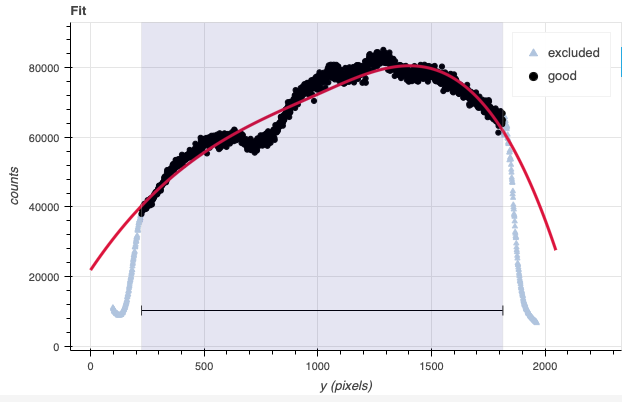
In Flamingos 2 spectroscopic observations a blocking filter is used. The sharp drops in signal at both end makes fitting a function difficult. Our recommendation is to set the region to be between the sharp drops and then fit a low-order cubic spline. This is a departure from what is being recommended for the other Gemini spectrographs where a high-order is recommended to fit all the wiggles.
For F2, only the overall shape should be fit. The detailed fitting will be taken care of when the sensitivity function is calculated using the telluric standard star.
We have defined appropriate defaults for the order and the region to use to normalize the flat for each grism and filter combinations. You should not have to modify them.
reduce @flatsci.lis
reduce @flattel.lis
If you wish to see the fit, you can add -p interactive=True to the
commands above. For example, this is how HK flat fit looks like.
6.2.8. Processed Arc - Wavelength Solution
Obtaining the wavelength solution for Flamingos 2 is fairly straightforward from the user’s perspective. There are usually a sufficient number of lines in the lamp. Note, however, that the lines becomes asymmetric as they move away from the center. There are provisions in the algorithm to account of that effect but the precision of the solution is limited.
The recipe for the arc requires a flat as it contains a map of the unilluminated areas. The master dark is required because of the strong pattern that is often horizontal and that could be interpreted as an emission line if not removed.
The solution is normally found automatically, but it does not hurt to visually inspect it in interactive mode.
reduce @arcs.lis -p interactive=True
The interactive tools are introduced in section Interactive tools.
6.2.9. Telluric Standard
The telluric standard observed after the science observation is “hip 98805”. The spectral type of the star is A2V.
To properly calculate and fit a telluric model to the star, we need to know
its effective temperature. To properly scale the sensitivity function (to
use the star as a spectrophotometric standard), we need to know the star’s
magnitude. Those are inputs to the fitTelluric primitive.
In Eric Mamajek’s list “A Modern Mean Dwarf Stellar Color and Effective Temperature Sequence” (https://www.pas.rochester.edu/~emamajek/EEM_dwarf_UBVIJHK_colors_Teff.txt) the effective temperature of an A2V star as 8800 K. The precise value has only a small effect on the derived sensitivity and even less effect on the telluric correction, so the temperature from any reliable source can be used. Using Simbad, we find that the star has a magnitude of K=7.778, which is the closest waveband to our observation.
Instead of typing the values on the command line, we will use a parameter file to store them. In a normal text file (here we name it “hip98805.param”), we write:
-p
fitTelluric:bbtemp=8800
fitTelluric:magnitude='K=7.778'
Then we can call the reduce command with the parameter file. The telluric
fitting primitive can be run in interactive mode.
Note that the data are recognized by Astrodata as normal F2 longslit science
spectra. To calculate the telluric correction, we need to specify the telluric
recipe (-r reduceTelluric), otherwise the default science reduction will be
run.
reduce -r reduceTelluric @tel.lis @hip98805.param -p interactive=True prepare:bad_wcs=new
The prepare:bad_wcs=new is needed because the WCS in the raw data
is not quite right and that leads to an incorrect sky subtraction and
alignment. See Recognizing and fixing bad WCS for more information.
At the findApertures step, you will notice that the two negative
beams are not the same depth. This indicates that the A and B beams
do not have similar flux from the source. While clouds could
explain some variations, in this case the two A positions have equal
flux and the two B have equal flux, but the flux at the B position is
a fraction of the flux at the A position.
The explanation is that the telescope movement, when supposedly moving along the slit to the B position, was not “along the slit”. Somehow the slit was misaligned. It is not understood why.
The consequence is that the final signal-to-noise is lower than expected. That slit misalignment is observed in the science sequence too.
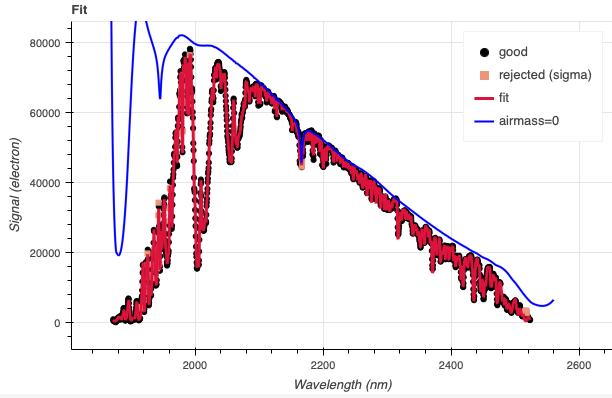
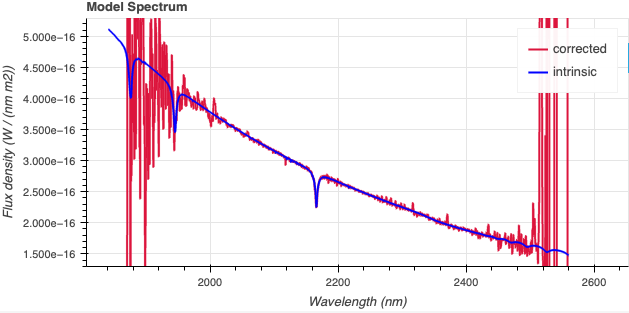
Using the defaults, the fit and model spectrum look like this:
6.2.10. Science Observations
The science target is a superluminal microquasar. We are using only the last eight frames of the program’s sequence. The dither pattern is AABB-AABB. DRAGONS will subtract the dark current, flatfield the data, apply the wavelength calibration, subtract the sky, stack the aligned spectra. Then the source will be extracted to a 1D spectrum, the telluric features removed, and the spectrum flux calibrated.
Following the wavelength calibration, the default recipe has an optional step to adjust the wavelength zero point using the sky lines. By default, this step will NOT make any adjustment. We found that in general, the adjustment is so small as being in the noise. If you wish to make an adjustment, or try it out, see Adjusting the Wavelength Zeropoint to learn how.
Note
When the algorithm detects multiple sources, all of them will be extracted. Each extracted spectrum is stored in an individual extension in the output multi-extension FITS file.
This is what one raw image looks like.
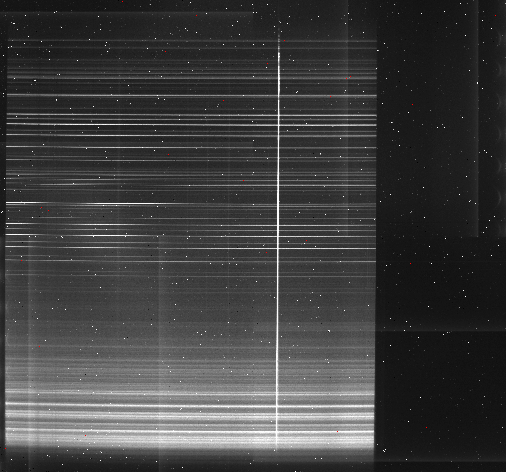
To run the reduction, call reduce on the science list. The calibrations will be automatically associated. It is recommended to run the reduction in interactive mode to allow inspection of and control over the critical steps.
There are many sources along the slit. We know that we are interested
only in the brightest one. Therefore, we set the maximum number of sources
to find to 1 in findApertures.
reduce @sci.lis -p interactive=True findApertures:max_apertures=1
As explained above in the telluric section, the slit was misaligned during the
observation resulting in the source slipping out of the slit when the telescope
was dithered to the B position. The flux in the B position is a fraction of
the flux in the A position. This can be seen in the uneven negative beams in
the findApertures profile.
In telluricCorrect, applying a shift of -0.1 helps better remove the
telluric features in the spectrum.
The 2D spectrum before extraction looks like this, with blue wavelengths at the bottom and the red-end at the top.
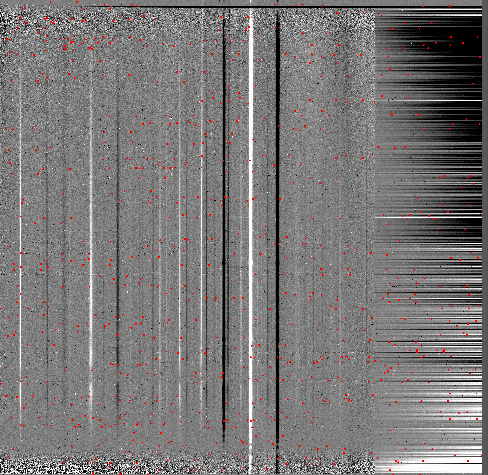
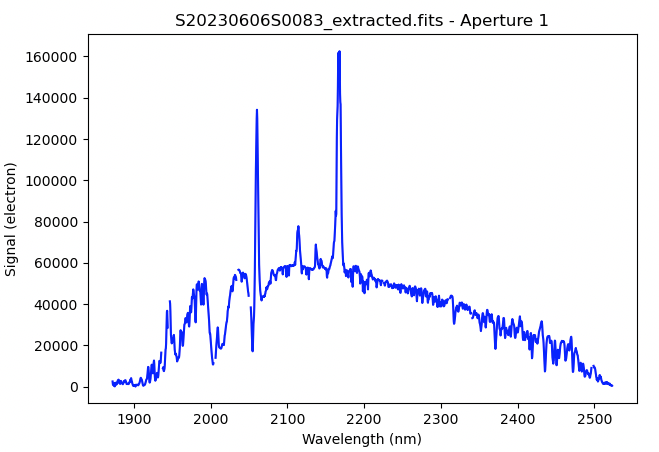
The 1D extracted spectrum before telluric correction or flux calibration,
obtained with -p extractSpectra:write_outputs=True, looks like this.
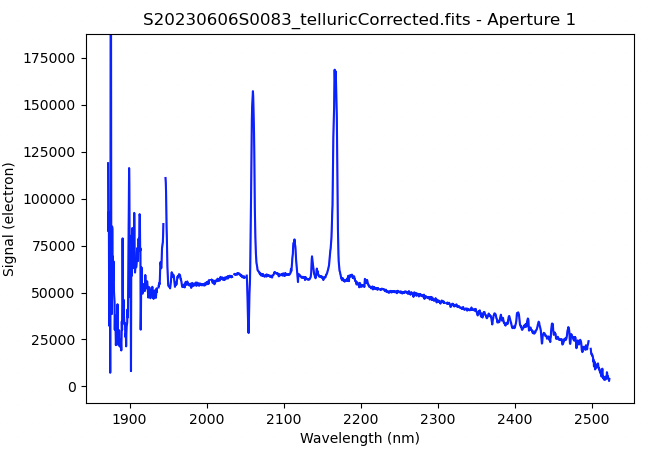
The 1D extracted spectrum after telluric correction but before flux
calibration, obtained with -p telluricCorrect:write_outputs=True, looks
like this.
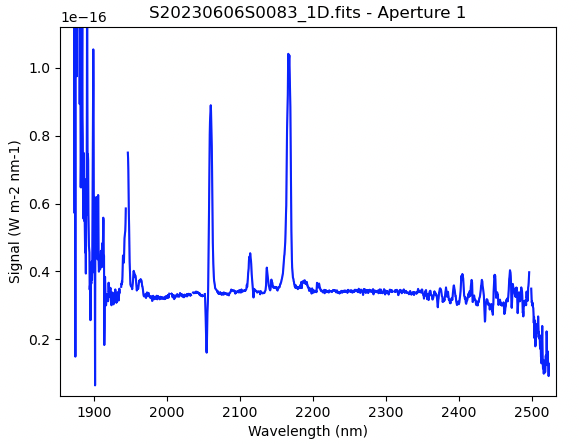
And the final spectrum, corrected for telluric features and flux calibrated.
dgsplot S20230606S0083_1D.fits 1